Skip to content

Google Shopping management, from feed to checkout.

Shopping ads put your product photo, price and store name on the results page before anyone clicks. The shelf space of Google, won or lost on the quality of your feed.

  • Product feed
  • Titles
  • Images
  • Prices
  • Ratings
  • Merchant Center

Part of Google Ads management at Aesthetic.

How the grid is won

No keywords. The feed does the talking.

Shopping campaigns don't bid on keywords. Google reads your product feed and decides which searches each product deserves. Your titles, prices and data quality are the targeting, which makes the feed the most valuable real estate in the account.

What it is

A product ad, priced per click.

Photo, title, price and store name in the results grid, pulled straight from your Merchant Center feed. You steer with feed data, campaign structure and negatives. Google decides the matching and prices every click at auction.
When it works

Clear photos, competitive prices.

Ecommerce with a clean feed and products that photograph well. Because the price shows before the click, Shopping rewards stores whose offer holds up next to the competitors sitting in the same grid.

When it's the wrong tool

Services, quotes, or uncompetitive prices.

No physical product or no feed means no Shopping. Bespoke and quote-based pricing doesn't fit the format, and a price the grid undercuts loses before the auction starts. Those budgets belong in Search or social instead.

How Aesthetic runs it.

  1. Fix the feed firstTitles rewritten around how people actually search, attributes filled, disapprovals cleared. No spend scales until the feed is worth scaling.
  2. Structure by marginCampaigns split so hero products and clearance stock never share a budget, with negatives shaping which searches each tier is allowed to win.
  3. Margin sets the targetPerformance read against margin and price competitiveness, so budget follows products that profit rather than products that merely sell.

What the grid punishes

Shopping spends evenly. Products don't sell evenly.

One default campaign treats your best seller and your dead stock the same. The account looks busy while a handful of products quietly do all the work.

  • Titles written for the website, not the searchFeed titles copied straight from product pages miss the words people actually type, so your products never enter the auctions that matter most.
  • One campaign, the whole catalogueWithout structure, budget drifts to whatever Google finds easiest to sell. Low-margin movers soak up clicks while the products that built the business go unseen.
  • Revenue counted, profit ignoredThe dashboard celebrates a healthy ROAS while shipping, returns and discounting eat what's left. Targets have to come from your margins, not from Google's suggestions.
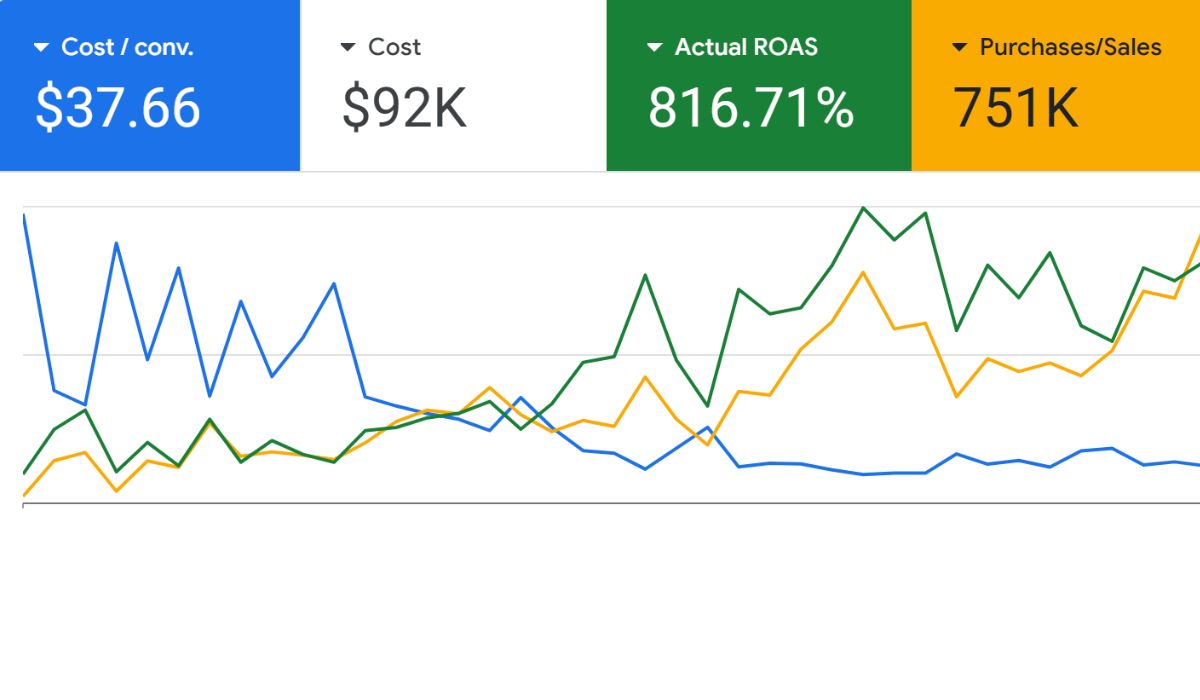
Live ecommerce Google Ads account managed by Aesthetic showing eight times average return on ad spend over twelve months
  • 8xAverage ROAS across 12 months
  • 79%Lower cost per purchase, $175 to $37
  • $800KRevenue generated in under 1 year

A live ecommerce account run by Aesthetic, with cost per purchase cut from $175 to $37 inside twelve months.

Free ROAS calculator

Your real return, not the dashboard's.

ROAS without margin is a vanity number. This calculator works out what your ads return after the cost of what you sell, for Google, Meta or any paid channel.

$

What you pay the ad platform each month.

$

The revenue those ads brought in.

%

The share of each sale you keep after the cost of the product or service.

Your ROAS

3.0x

Profitable. Every ad dollar makes money after costs.

Return needed to break even

2.2x

Profit left each month

$1,050

Kept per $1 spent on ads

$0.35

ROAS return on ad spend

Revenue divided by ad spend. A 3x ROAS means every dollar of ads brought back three dollars of revenue. It says nothing about profit until margin enters the picture.

Breakeven ROAS the floor

One divided by your gross margin. At a 45% margin you need 2.2x just to cover the cost of goods and the ads. Anything below this line is a loss wearing a revenue costume.

Profit on ads the real number

What's left after paying for the products and the ads. Revenue is money moved; this is money kept, and it's the number your bidding targets should answer to.

The calculator runs in your browser. Your numbers aren't stored or sent anywhere.

What do Google Shopping ads cost?

You pay per click, and the auction sets the price, which varies wildly by category and competition. The more useful question is what a sale can afford to cost you: take your average order value and margin, then work backwards to a breakeven cost per purchase.

The calculator on this page does exactly that from your own numbers.

Do I need a Merchant Center account?

Yes. Merchant Center holds your product feed and decides whether your products are eligible to show at all. Google Ads only handles the bidding.

Most Shopping problems that look like campaign problems are actually Merchant Center problems: disapprovals, missing attributes and stale prices.

What makes a good product title?

Because there are no keywords in Shopping, the title is the main signal Google reads to match your product to searches. A title that says what people type, with the brand, product type and key attribute up front, enters more of the right auctions at a better price.

Title work is the cheapest growth left in most feeds.

Why were my products disapproved?

The usual culprits: prices or availability in the feed not matching the website, missing identifiers like GTINs, image quality violations, or policy-restricted categories.

Disapprovals compound quietly, because every disapproved product is inventory your competitors get the grid for. Clearing them is step one of any takeover.

Can my products show on Google for free?

Yes. Free listings put your products in some Google surfaces at no cost once Merchant Center is set up, and every store should claim them.

They're a complement rather than a substitute: free listings take whatever visibility is left over, while paid Shopping buys the grid placements where buying decisions actually happen.

How does Google decide which searches show my product?

It reads your feed: title, description, product type, category and attributes, then matches products to queries it considers relevant. You can't pick the searches directly, but you shape them through the feed and block the irrelevant ones with negatives.

Good feeds get good searches; thin feeds get leftovers. The same feed quality decides what Performance Max can do with your products.

Can I stop Shopping ads showing for irrelevant searches?

Yes, with negative keywords, the one keyword control Shopping gives you. The search terms report shows what you actually paid for, and a weekly pruning cadence turns junk queries into negatives before they compound.

Campaign priority settings can also route cheap generic searches and valuable specific ones to different budgets.

Should every product be in one campaign?

Almost never. One campaign means one budget and one target across products with completely different margins, which lets Google spend where it's easiest rather than where it's profitable.

Splitting by margin and role, hero products, steady sellers, clearance, is the single highest-impact structural change in most Shopping accounts.

My prices are higher than competitors. Will Shopping still work?

Sometimes, and it's better to know early. The grid shows your price next to everyone else's before the click, so a premium price needs a visible reason: ratings, shipping speed, bundle value or brand.

If the gap is large and unexplained, the honest move is fixing the offer before spending on traffic.

Do Shopping ads work for small catalogues?

Yes. A tight catalogue of products people actually search for can outperform a sprawling one, because budget concentrates instead of spreading thin.

Small catalogues also make feed quality manageable: ten products can have hand-polished titles and images in an afternoon. Volume matters less than demand for the specific products.

How do star ratings get on my Shopping ads?

Product ratings come from review feeds, either collected through Google or supplied via approved third-party review platforms, and they need enough volume per product before stars show.

They're worth the setup effort: in a grid where every listing shows a photo and a price, stars are one of the few trust signals available.

Why is my best seller getting no impressions?

Usually one of three things: its title doesn't match how people search for it, a campaign priority or budget cap is routing its auctions elsewhere, or it's quietly disapproved in Merchant Center.

The product report shows impressions per item, so the diagnosis takes minutes. Accounts just rarely look at it.

How often does my product feed need updating?

At minimum, as often as your prices and stock change, because a mismatch between the feed and the website is the fastest route to disapprovals. Automated daily syncs are the floor; stores running sales or volatile stock need more.

Feed maintenance is unglamorous, which is exactly why it's where accounts quietly win or lose.

Ready when you are

Put judgement back in the loop.

A free 30-minute call with the strategist who'd run your account. Bring your Merchant Center and leave knowing whether your feed is winning the grid or losing it on the title alone.