Every time someone searches on Google, an auction runs before the results finish loading. You never see it, but it decides whose ad shows, where it sits and what each click costs.
Most business owners picture it like eBay: whoever’s willing to pay the most wins, so they keep nudging the bid up like it’s the last five minutes of an auction for a vintage Stratocaster. Google Ads doesn’t work like that, and that one misunderstanding is behind a lot of wasted ad spend.
Here’s how Google Ads actually works, in plain English, and what it means for how you set up your account.
The short version
Every search starts a tiny auction.
- An auction runs on every search. Each time someone searches, Google decides which ads show and in what order.
- The highest bid doesn’t automatically win. Google ranks ads on six factors, and your bid is only one of them.
- Quality lowers your price. Google says higher-quality ads can often lead to lower costs per click.
- You rarely pay your full bid. You pay the minimum needed to beat the ad below you and clear Google’s thresholds.
- Keywords are a starting point. Match types, Smart Bidding and AI Max decide which searches you actually show for.
The two-minute version
Strip away the buzzwords and Google Ads works like this:
- You set it up. You choose keywords, write ads, pick a landing page and set a budget and a bid strategy.
- Someone searches. Google finds every advertiser whose keywords are relevant to that search.
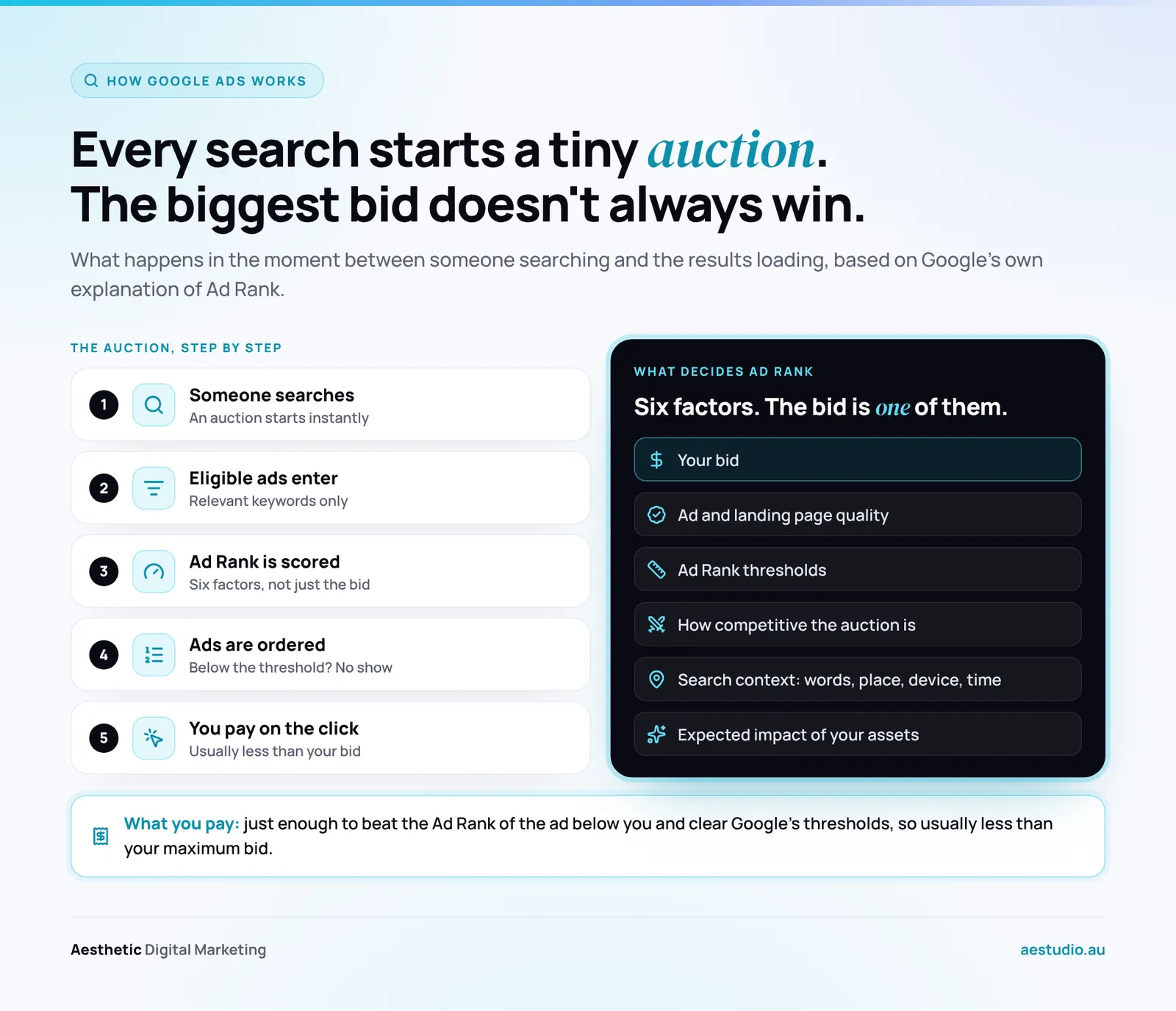
- An auction runs. Google gives each eligible ad a score called Ad Rank.
- The ads are ordered. Higher Ad Rank generally means a higher position. Ads that don’t clear Google’s minimum quality bar don’t show at all.
- You pay when someone clicks. On most Search campaigns you’re charged per click, not per view, and usually less than your maximum bid.
That happens again on the next search, and the one after that. Every search is a fresh auction, so your position can change from one search to the next.
What actually decides who wins: Ad Rank
Ad Rank is the score that decides whether your ad shows and where. According to Google’s own explanation of Ad Rank, it comes down to six things:
- Your bid. The most you’re willing to pay for a click.
- The quality of your ad and landing page. How useful and relevant they are to the person searching.
- Ad Rank thresholds. The minimum score an ad needs to show in a given spot at all.
- How competitive the auction is. When two ads have similar Ad Rank, they have similar chances of winning a spot.
- The context of the search. Things like the words used, the searcher’s location, their device and the time of day.
- The expected impact of your assets. Extras like phone numbers, sitelinks and images that make the ad more useful.
Notice where the bid sits. It’s one factor out of six. Google says plainly that a business can win a higher position at a lower price than a competitor with a bigger bid, if its keywords, ads and assets are more relevant.
That’s good news if you’re up against bigger budgets. It means the fixes worth doing first are usually free: tighter keywords, ads that echo the search and a landing page that matches it.
Why you rarely pay your full bid
Your bid is the most you’re willing to pay for a click. What you’re actually charged is what Google calls the actual cost per click, and it’s usually lower than your maximum.
The rule is simple. You pay the minimum needed to keep your position: enough to beat the Ad Rank of the ad directly below you and to clear Google’s thresholds. If there’s nobody below you, you pay a reserve price instead.
Because quality feeds into Ad Rank, a more relevant ad needs less bid to hold the same spot. That’s why Google says higher-quality ads can often lead to lower costs per click. Two businesses can sit in the same position and pay very different amounts for it.
| What most people assume | How Google Ads actually works |
|---|---|
| The highest bid wins | Ad Rank decides, and the bid is one of six factors |
| You pay what you bid | You pay the minimum needed to beat the ad below you |
| Quality Score sets your rank | Quality Score is a diagnostic; Ad Rank uses the quality signals behind it |
| Keywords match searches word for word | Match types and Google’s AI match on meaning and intent |
What Quality Score actually tells you
Quality Score is a 1 to 10 rating Google gives each of your keywords, and it’s widely misunderstood. In Google’s words, “Quality Score is not an input in the ad auction.” Google describes it as a diagnostic tool: a summary of how your ads compare with other advertisers’.
It’s built from three parts, each rated above average, average or below average against advertisers who showed for the same searches over the last 90 days:
- Expected click-through rate. How likely people are to click your ad.
- Ad relevance. How closely your ad matches what the person was looking for.
- Landing page experience. How relevant and useful your page is once they click.
So don’t chase the number itself. Use it to find the weak link. A “below average” landing page experience, for example, tells you to work on the page before you touch the bid. If that’s you, a purpose-built landing page designed for paid traffic usually does more than any bid change.
Keywords and match types: which searches you actually show for
Keywords tell Google what you want to show up for. How strictly Google reads them depends on the match type:
- Broad match is the default. Your ad can show on searches related to your keyword, even ones that don’t contain its words. Google may also look at your landing page, your other keywords and what the person searched recently.
- Phrase match, written in quotation marks like “emergency plumber”, shows on searches that include the meaning of your keyword.
- Exact match, written in square brackets like [emergency plumber wollongong], shows on searches with the same meaning or intent. It gives you the most control and the least reach.
Two things catch people out. First, exact match now matches meaning, so close variants of your keyword still get through. Second, Google says it’s critical to pair broad match with Smart Bidding. Without it, broad match can spend money on loosely related searches.
Whatever match types you use, check your search terms report regularly and add negative keywords for anything irrelevant. I’d check it weekly while a campaign is new, because that’s when broad match wanders most.
Bidding: you or the machine
You can set bids yourself with manual CPC, or let Google set them with what it calls Smart Bidding. Smart Bidding sets a bid for every single auction, using signals you can’t see or adjust manually, like the searcher’s device, location, time of day and whether they’ve visited your site before.
The four Smart Bidding strategies are:
- Maximise conversions: get as many conversions as possible within your budget.
- Target CPA: get conversions at or around a cost you set.
- Maximise conversion value: get as much revenue as possible within your budget.
- Target ROAS: get revenue at or around a return you set.
From June 2026, Google renamed “Maximise conversions with a target CPA” to plain “Target CPA”. The bidding works the same; only the label changed. I covered the wider shake-up in my post on Google Ads target bidding changes.
The catch with Smart Bidding is that it’s only as smart as the data you give it. If your conversion tracking counts the wrong things, the machine will chase them with the enthusiasm of a labrador after a tennis ball that turns out to be a lemon. Set a sensible target with my guide to what a good ROAS actually is, and make sure tracking is right before you hand over the controls.
Where AI Max fits in
AI Max is Google’s newest layer for Search campaigns: a set of features you switch on inside an existing Search campaign, rather than a new campaign type. Per Google’s AI Max help page, it does three things:
- Search term matching uses broad match and keywordless technology to find searches beyond your keyword list.
- Text customisation uses your ads, landing pages and generative AI to write ad copy tailored to each search.
- Final URL expansion can send people to a different page on your site if Google thinks it will perform better.
Each one can be switched off individually. Google also notes AI Max won’t be effective if a campaign is limited by budget. If you turn it on, keep a close eye on the search terms and landing pages it chooses, because it’s making decisions you used to make yourself.
Free Google Ads audit
Find out where your ad budget is leaking.
A senior Google Ads specialist records a Loom walkthrough of your account: where the budget leaks, what to fix first and the order to fix it. It lands in your inbox within 72 hours.
Where your ads can show
The auction above is how Search works, and the same Ad Rank logic sits under the other campaign types too. Each one reaches people in a different place:
- Search: text ads on Google results when someone searches for what you sell. The best fit for most service businesses.
- Performance Max: one campaign that runs across Search, YouTube, Display, Gmail, Maps and more. My guide to Performance Max covers when it works and when it burns money.
- Shopping: product listings with an image and price, for online stores. See Google Shopping ads, explained.
- YouTube: video ads before and during videos. More in my post on YouTube ads.
- Display and remarketing: image ads across websites and apps, often used to bring back people who already visited. Here’s how remarketing should be set up.
When Google Ads is the wrong channel
Everything above depends on one thing: someone has to search first. If nobody searches, there’s no auction and no ad. That sounds obvious, but it’s the reason some businesses pour money into Google and get almost nothing back.

A client came to us torn between Google and Facebook for a product with little to no search volume. People didn’t go out of their way to look for it. They wanted it when something reminded them it existed. Google is built for high intent, people actively hunting for an answer, so there was barely an auction to win. Facebook was the better bet because it’s disruptive: it puts the product in front of people mid-scroll and does the reminding for you. So before you build a Google campaign, check that people are actually searching for what you sell.
A quick way to check is Google’s free Keyword Planner, inside your Google Ads account. If the searches aren’t there, no amount of bid tuning will create them. My breakdown of Google Ads vs Facebook Ads covers where your first dollar should go.
Five things to do with this in your account
Here’s what I’d act on first:
- Fix relevance before you raise bids. A closer match between the search, the ad and the landing page improves Ad Rank and can lower what you pay.
- Get conversion tracking right first. Smart Bidding learns from it. Bad data trains it to chase the wrong results.
- Read your search terms report. Broad match and AI Max will find searches you didn’t choose. Some will be gold and some will be waste.
- Send each click to a page that matches. Your homepage is rarely the right answer to a specific search.
- Set a budget that can actually learn. My breakdown of what Google Ads costs in Australia will help you size it.
Not sure whether to start with ads at all? Our comparison of SEO vs Google Ads walks through which one to do first.
Frequently asked questions
How does Google decide which ads show first?
Google gives each eligible ad a score called Ad Rank. It’s based on your bid, the quality of your ad and landing page, Ad Rank thresholds, how competitive the auction is, the context of the search and the expected impact of your assets. The ad with the highest Ad Rank generally gets the top spot.
Does the highest bid always win in Google Ads?
No. The bid is one of six factors. A more relevant ad can win a higher position at a lower price than a competitor bidding more.
How much do you pay per click on Google Ads?
Usually less than your maximum bid. You pay the minimum needed to beat the Ad Rank of the ad below you and clear Google’s thresholds. What that works out to depends on your industry and competition. For Australian figures, see what Google Ads costs in Australia.
Does Quality Score affect what I pay?
Not directly. Google says Quality Score isn’t an input in the auction; it’s a diagnostic tool. But the quality it measures, like expected click-through rate, ad relevance and landing page experience, does feed into Ad Rank, and better quality can often lower your cost per click.
Do I pay when my ad shows, or only when someone clicks?
With most Search campaigns you pay only when someone clicks. Some other campaign types and bid strategies charge differently, such as per thousand impressions, so check the bid strategy on each campaign.